
If you run email and SMS in Klaviyo, you have probably spent real time building segments: first-time buyers, VIPs, lapsed customers, people due for a refill. Those segments tell you who bought, what they bought, and roughly when they might be ready to buy again. Most brands use them only for inbox and phone messages.
Klaviyo direct mail is a way to put those same segments to work in the mailbox. Instead of paying to reach customers you already acquired through another round of ads, you send them something physical, from your brand, that they can hold. Here is what that looks like in practice.
Why a segment is the right starting point
A segment is useful for mail for the same reason it is useful for email: it is a group of people who share a behavior or status that matters to your business. The difference is cost per touch. An email costs almost nothing to send, so you can mail your whole list. A physical piece costs more, so it pays to be selective.
You have already separated your best customers, one-time buyers, and lapsed buyers. With direct mail, you pick the group where a personal, physical touch is most likely to change what happens next.
Segments that tend to make sense for mail
Tangible Post describes several lifecycle moments where Klaviyo data can drive a mailed piece:
- Post-purchase: show new customers there is a real brand behind the box (see what to write in a handwritten thank-you note).
- Second purchase: give first-time buyers a personal reason to come back.
- Cross-sell: put the right product offer in front of proven buyers.
- Replenishment: reach repeat-use customers before they reorder elsewhere.
- VIP and loyalty: give top customers early access or recognition.
- Milestones: mark an anniversary or year-end thank-you.
- Win-back: remind lapsed customers why they chose you in the first place (see how to win back lapsed ecommerce customers).
If you already have a segment for any of these in Klaviyo, you have the audience for a campaign. Start with one. A small, well-defined group is easier to evaluate than a broad send.
What the customer actually receives
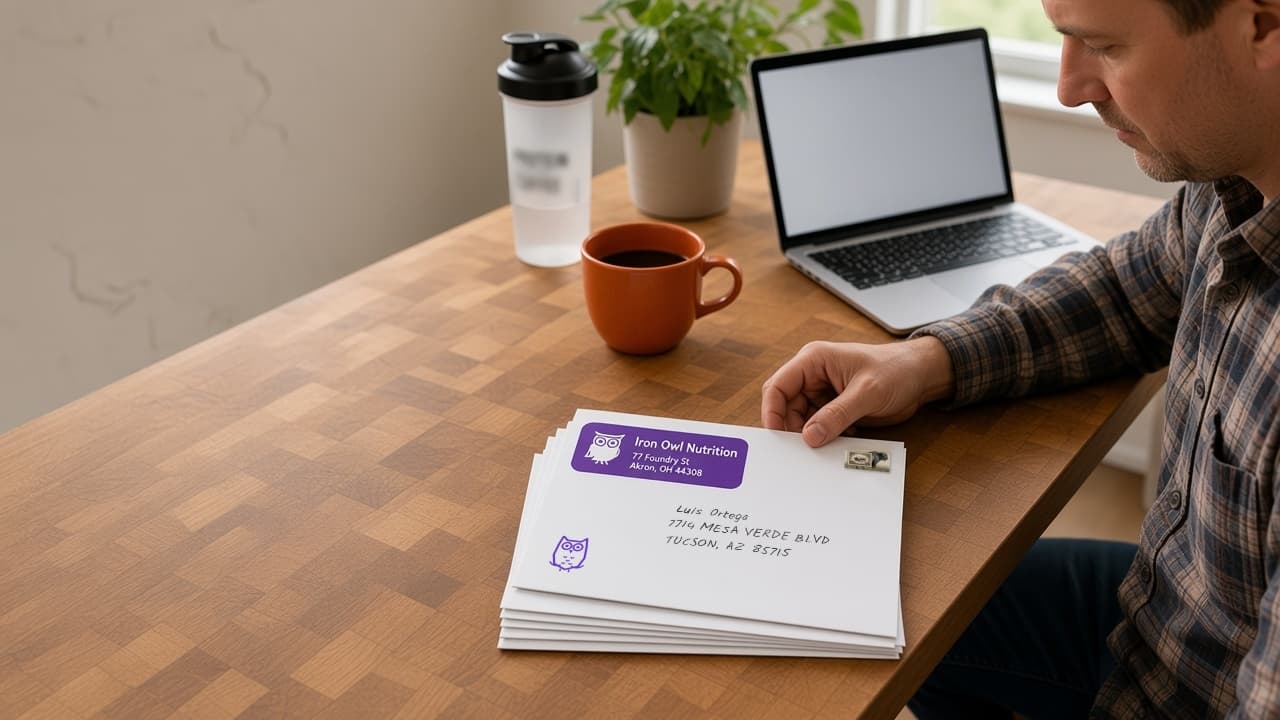
With Tangible Post, the mail is not a postcard or a generic letter. It is a branded experience that lives outside your product and your packaging. Each piece is built from:
- A custom-printed card, branded on one side, with a handwritten note on the other
- A handwritten address
- A real stamp
- Your custom-printed envelope, if you add your design (otherwise it goes out in a plain white A7 envelope)
- A printed return address, when you add a return label
The note is written in real ink with a real pen, not printed in a font made to look like handwriting. The goal is loyalty: the customer should open the envelope and feel that the money they spent went to a merchant who noticed them. For a closer look, see what actually gets mailed in a branded package.
How to go from segment to mailbox
Here is how the process works.
1. Connect your data. Connect your Klaviyo account with a private API key, or upload a CSV of customers. From Klaviyo, you import a list or segment as an audience and choose which custom profile fields to bring in with it. A CSV import maps names, company, and address columns, plus email if you want orders matched back to the mailing.
2. Choose a campaign or a flow. A one-time campaign mails an audience once. An automated flow keeps sending: it can be triggered when profiles enter a Klaviyo segment or by a webhook from a Klaviyo flow, and you set guardrails such as a cooldown and an optional monthly budget. Flows require a return label on the envelope.
3. Write the message and set the offer. Personalization can go beyond a first name. The note can use merge fields for first and last name, company, city, a coupon code, and the coupon's expiration date. Campaigns built on a Klaviyo audience can also use the custom profile fields you imported; flows use the standard fields only. A unique code per customer also makes it easier to see who responded.
4. Check the proof. You see exactly what will print before you pay, so check merge fields and offer wording carefully at this step. After you pay, you can still cancel a campaign for a refund while it is processing. Once it goes to print, it can't be stopped or changed.
5. Production and mailing. Tangible Post prints, writes, quality-checks, stamps, and mails each piece. The site says campaigns typically launch within 5 to 7 business days from purchase, with postal delivery time on top of that. Plan backward from the date you want mail to land, especially around busy seasons.
6. Measure. Tangible Post uses matchback attribution with your Klaviyo order data. An order is matched to the mailing by its coupon code first, then by the recipient's Klaviyo profile or email within the attribution window. The window runs from launch until 7 days after the coupon expires, or 90 days if the coupon has no expiration date (or there is no coupon). The dashboard reports the revenue and orders matched to your mail, the response rate, and the return per $1 spent. How to measure direct mail ROI for ecommerce covers holdout groups and the math.
A few practical tips
- Clean addresses first. Tangible Post formats and standardizes addresses, but it cannot know that a customer moved. Older segments, like long-lapsed buyers, are more likely to include outdated addresses.
- Match the message to the segment. A thank-you to a VIP should read differently from a nudge to someone who bought once a year ago. Write for the specific group.
- Keep expectations grounded. Tangible Post's own promise covers production quality: properly made, written with a real pen, correctly assembled, and mailed on time. It does not promise a response rate. Results depend on your offer, list, timing, and market.
Getting started
If you already have a Klaviyo segment that you wish you could reach in a more personal way, that segment is the place to start. Pick one group, decide what you want them to do, and write a note that sounds like it came from someone who remembers them.
When you're ready to try it with your own data, set up your Tangible Post account, connect Klaviyo, and start with one segment.